Migrating from WordPress to 11ty - Part 2
In the previous post I discussed why I moved from WordPress to 11ty, feasibility study and initial part of setting up 11ty site from the content exported from WordPress. In this post, I will discuss mainly
- the challenges I faced in getting images to work
- setting up a writing workflow to make it as hassle-free as possible
Challenges in migrating images
In the previous post we saw how the Node package wordpress-posts-to-markdown can pull all the content along with the media and store them on our local computer. But the way it stores them is not really as 11ty expects them to be. For example, after a couple of tries, this is what I got
- for every post there is a directory with sluggified title of the post
- under this, there is a index.md file with post content
- under the same directory, there is also another directory named "images" which contains all the images
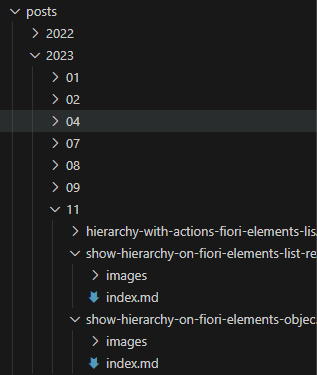
However, 11ty expects all static media to be in /static/img/ directory. Also, we need to add below passthrough line in .eleventy.js to copy those images to _site/static/img/ directory.
eleventyConfig.addPassthroughCopy("static/img");However, if we want to keep the images under same directory as that of posts or wherever else we want, then below passthrough copy line should help us do that - 11ty documentation explaining it here
eleventyConfig.addPassthroughCopy("**/*.jpg");
eleventyConfig.addPassthroughCopy("**/*.png");
But, what if I don't want to keep the images under each post but have them moved to static/img directory? And, why would I want to do that? My reasoning behind this was, in case I want to be able to serve all these media from a CDN in future, then it would be much easier to migrate them if they were under one directory static/img rather than scattered all over the posts/ directory.
I may be overthinking here. I don't know.
Migrating images of existing posts
After migrating content from WordPress to 11ty, images were under respective post's directory, like this -
-- posts/
-- 2023/
-- 01/
-- some-post-name/
-- images/
-- image1.png
-- image2.jpeg
-- ...
2 steps required to move them static/ directory
- move the images files to static/img/2023/01/...
- update the image paths in all the respective posts markdown files
I wrote this Python script migrate.py that traverses all the subdirectories of posts/directories and then copies the image files to static/img/ directory by creating required subdirectories for year and month.
Then, it also reads all the markdown files and updates the new image paths in respective post files.
Workflow for new posts
Finding a tool to write
I did not want to struggle with all markdown syntaxes while writing the content. Though there is not much to remember for most blog use cases, it is still not nice to have to think of those while writing content. Also, I wanted to a tool I could work with offline. Further, such a tool should produce a markdown file from the content I am writing.
I have been using Obsidian for a while now as a note-taking app on my laptop. Free version is more than enough for this purpose. This specific content is written using this workflow.
Publishing new posts
Obsidian saves all the files as markdowns. So, I needed a way to copy those markdown files that are ready for publishing to 11ty "posts" directory under correct year and month subdirectory. But, I did not want to do this manually every time I wanted to publish a post. So, again automate the boring the stuff with Python came to rescue.
Such a script should do something like this
- Copy the markdown produced by Obsidian to 11ty's posts directory under correct year/month/ subdirectory. If such a directory does not exist yet, then create that first
- 11ty needs some YAML front matter to create collections and add post metadata such as created date, author etc. Script must add this front matter while copying markdown to 11ty
- Make sure same post does not get published again if I run the script - over a period of time, there will be (hopefully) many posts. So, script should not be burdened with so many posts every time.
- for this, once a post is published, script should also move the original markdown to a different Obsidian directory
- If you paste an image on Obsidian, it saves the the image in the Obsidian's root directory as "Pasted image ..... .png" and link to that would be inserted in the markdown file. So, the script
- must find that image file
- copy that to 11ty's static/img/ directory under correct year/month subdirectory
- update the link in markdown "after" copying the markdown to 11ty's folder but NOT touch the original markdown in Obsidian's directory
def extract_and_replace_image_names(content, modif_date):
year = modif_date.strftime("%Y")
month = modif_date.strftime("%m")
special_chars = r'[^a-zA-Z0-9\.]'
image_names = [{x: re.sub(special_chars, "-", x).lower()} for x in re.findall(r"Pasted image \d+.png", content)]
new_content = content
for image in image_names:
for key, value in image.items():
new_content = new_content.replace(f"![[{key}]]", f"")
return { 'image_names' : image_names, 'content': new_content }
def copy_images(image_names, images_dest_root, image_source_root, modif_date):
year = modif_date.strftime("%Y")
month = modif_date.strftime("%m")
image_dest_dir = fr"{images_dest_root}\{year}\{month}"
for image_name in image_names:
for orig_image, new_image in image_name.items():
image_dest_file = f"{image_dest_dir}\\{new_image}"
image_source_file = f"{image_source_root}\\{orig_image}"
try:
os.makedirs(os.path.dirname(image_dest_file), exist_ok=True)
shutil.copy(image_source_file, image_dest_file)
except OSError as e:
print("MAKEDIRS error")
print(e)This is what the workflow looks like now:
- I created a 3 directories in Obsidian under a parent directory for all posts named "Blog/"
- Draft/
- contains all the posts that I am currently writing and want to publish
- Pipeline/
- content that I am currently writing or want to write but are not ready to be published yet
- Published/
- all published posts
- Draft/
Here is the script that does this job - newpost.py
Post Metadata
I add 3 custom properties to every post in Obsidian viz.
- hashtags
- comma separated list of tags
- categories
- comma separated list of categories
- excerpt
- an excerpt of the post
Thankfully, Obsidian also saves them as frontmatter to markdown file. During migration 11ty directories, they will be added to post frontmatter along with other metadata such as author, date, title etc. But the original Obsidian file is not changed.
From newpost.py file, here the code excerpt that is preparing the 11ty front matter
def make_front_matter(file_content="", title="", file_date=None):
    if not file_date:
        return

    """
    Sample Obsidian Front Matter:
    ---
    excerpt: Learn the basics of software architecture, different aspects of it and what it entails to be an architect
    categories: software-architecture, sap
    hashtags: architecture, availability, foundation, software, testability
    ---
    """

    orig_fm_list = [x for x in filter(lambda t: t, [t for t in file_content.split("---")[1].split("\n")])]
    # fm => key:value
    fm_dict = dict([ tuple( s for s in fm.split(":") ) for fm in orig_fm_list])
    category_string = reduce(lambda x,y: x + "\n  - " + y, fm_dict.get('categories', "").split(","))
    tag_string = reduce(lambda x,y: x + "\n  - " + y, fm_dict.get('hashtags', "").split(","))
    eleventy_front_matter = f"""--- \ntitle: {title} \ndate: {file_date.strftime("%Y-%m-%d")} \ncategories:\n  - {category_string}\ntags:\n  - {tag_string}\nexcerpt: {fm_dict['excerpt']} \n------\n"""

    return { 'eleventy': eleventy_front_matter, }
Thoughts on current workflow?
What I like about it?
It simplifies my content writing part -
- Obsidian is good in that while writing you do not have to remember all the markdown syntaxes. It is WYSIWYG kind of editor for markdown files.
- I can paste images as I like while writing the content and the script will make sure to copy them and replace the image names/paths correctly
- maintaining the post metadata is much easier in Obsidian as it provides a tabular display for that
What I don't like about it or want to change in future?
- I still have to create a branch on my local git repo every time I want to post something new
- commit the changes locally, push them to my GitHub repo
- Create a pull request on my GitHub repo and merge the changes
I would want to automate these steps or at least some part of them.